Monthly Planner and Monthly Calendar: Smart Strategies for KDP Templates
Creating a successful low-content book business often hinges on the balance between speed and quality. For entrepreneurs, coaches, and digital creators, a Monthly Planner or Monthly Calendar is more than just a scheduling tool; it is a foundational product that can generate passive income when executed correctly. Utilizing a one-page Monthly Calendar Canva KDP template offers a significant advantage, allowing you to bypass the steep learning curve of graphic design while maintaining professional standards. However, simply downloading a "Done for You" asset does not guarantee sales or usability. Many beginners overlook critical customization steps, leading to generic products that fail to stand out in saturated marketplaces like Amazon KDP, Etsy, or Shopify.
To truly earn money efficiently with pre-made templates, you must approach them as a starting point rather than a final destination. Understanding how to leverage these resources without falling into common traps is essential for building a sustainable brand. Whether you are a finance coach creating client workbooks or a blogger designing printable planners, avoiding specific pitfalls will save you time and protect your reputation.
The Misconception of "Ready-to-Publish" Templates
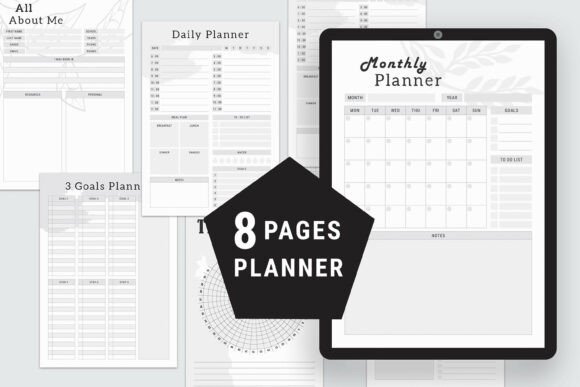
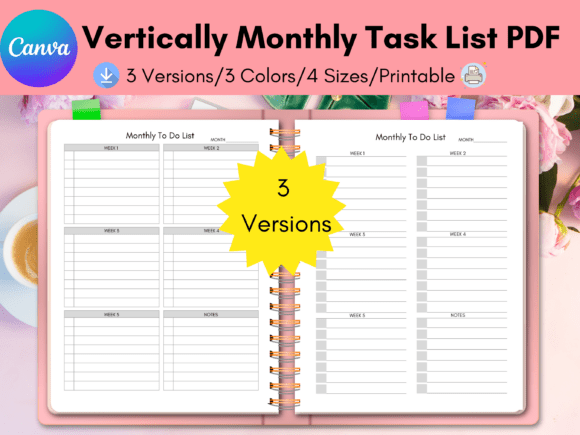
One of the most frequent mistakes new KDP publishers make is assuming that a template is ready for immediate upload. While this Monthly Planner template includes four distinct monthly calendar pages and comes in versatile sizes like Letter (8.5’’ x 11’’), A4, A5, and Happy Planner Classic, it requires intentional modification. Uploading a template exactly as purchased or downloaded is a violation of intellectual property policies on many platforms and results in duplicate content issues.
Platforms like Amazon KDP actively flag books with identical interiors. If you use the default layout, fonts, and graphics provided in the Canva source file without alteration, your book may be blocked or buried in search results. Furthermore, customers seeking a unique Monthly Calendar will recognize generic designs, which diminishes perceived value. The solution is to treat the template as a structural skeleton. You must add your own color palette, logo, branded fonts, and custom icons. This level of customization transforms a generic asset into proprietary intellectual property that you can legally sell as your own product across multiple channels.
Overlooking Technical Specifications and Bleed Settings
Another area where efficiency turns into frustration involves formatting errors. A template might look perfect on a screen but fail during printing if margins and bleed are ignored. This specific template offers multiple size options, which is excellent for versatility, but it also increases the risk of selecting the wrong dimensions for your target audience. For example, confusing the Happy Planner Classic size (7’’ x 9.25’’) with standard A5 (5.8’’ x 8.3’’) can result in a product that does not fit the intended binder or notebook cover.
Before finalizing your Monthly Planner, always verify the trim size against marketplace requirements. In Canva, ensure that safe zones are respected so that dates and writing spaces do not get cut off during the binding process. A practical approach is to create a test print at home or order a physical proof copy from KDP before launching. This small investment prevents negative reviews related to poor formatting, which can permanently damage a listing’s conversion rate. Always check that the four included calendar pages align correctly when printed double-sided, especially if you are rearranging or duplicating pages to create a full-year planner.
Navigating Canva Licensing and Commercial Rights
Misunderstanding licensing is perhaps the most dangerous error for digital product sellers. There is a distinct difference between using Canva’s free version and understanding commercial usage rights for template elements. While the free version of Canva is powerful enough to edit this Monthly Calendar template, not every element within the library is cleared for commercial resale in a static format. Some graphics are licensed only for personal use or require attribution.
To avoid legal complications, audit every element in the template before publishing. Replace any uncertain graphics with your own creations or verified commercial-use assets. When you customize the template by changing colors, resizing elements, and integrating unique typography, you are generally creating a new derivative work. However, simply placing a standalone stock flower in the corner of a calendar page does not constitute significant transformation. Focus on cohesive branding. As a life coach or content creator, your planner should reflect your visual identity. Use consistent hex codes for colors and select font pairings that match your website and social media presence. This not only ensures compliance but also builds brand recognition among your buyers.
Strategic Customization Beyond Aesthetics
Many users focus solely on making the Monthly Planner look pretty while neglecting functionality. A beautiful calendar that lacks adequate writing space or logical flow will receive poor feedback. When editing the Canva source file, consider the end-user's experience. Are the daily blocks large enough for handwriting? Is there space for notes, goals, or habit tracking? The ability to mix and match pages allows you to tailor the interior to specific niches.
For instance, a finance coach might duplicate the monthly overview page and add a budget tracking section, while a teacher might add a grading column. Do not feel restricted to the original four pages. Rearrange, delete, or expand the content to solve a specific problem for your audience. This functional customization is what separates high-selling niche planners from low-quality generic ones. By focusing on utility alongside aesthetics, you increase customer satisfaction and encourage repeat purchases.
Optimizing for Multiple Marketplaces
Selling on Amazon KDP is different from selling digital downloads on Etsy or Gumroad. A common oversight is using the exact same PDF file for both print-on-demand and digital distribution. Print files require bleed and crop marks, whereas digital planners often need hyperlinks and RGB color profiles for tablet use. If you intend to sell this Monthly Calendar as a digital download, ensure you export it in the correct format and remove print-specific artifacts.
Additionally, consider the metadata and presentation for each platform. On Shopify or your own website, you have full control over product descriptions and bundling. You might bundle the Letter Size template with the A5 version as a value-add. On KDP, your description must be keyword-rich yet natural, highlighting the specific benefits of your customized planner. Avoid keyword stuffing; instead, explain how your unique modifications serve the user. Mentioning that the planner is suitable for bloggers, educators, or small business owners helps the right customers find your product organically. Always review the latest guidelines for each marketplace, as terms regarding AI-generated content and template usage evolve frequently.
Verifying Quality Before Launch
Finally, establish a pre-launch checklist to ensure professionalism. Before you hit publish on any platform, confirm that all text is legible at the intended print size. Fonts that look elegant on a 27-inch monitor may become unreadable when shrunk to A5. Test the contrast between background colors and text; low contrast causes eye strain and printing issues. Ensure your logo and branding name are placed consistently and do not interfere with functional areas of the Monthly Planner.
Taking these corrective steps transforms a simple Canva template into a robust business asset. By respecting licensing, prioritizing functionality, and adhering to technical specifications, you move beyond the amateur mistakes that plague the low-content book market. This disciplined approach allows you to save time through templating while still delivering the unique value that discerning customers demand. Whether you are just starting out or scaling an existing store, treating your templates with professional rigor is the key to long-term profitability and brand integrity.