Monthly Content Planner Infographic for Creators
Staying consistent on social media often feels like a juggling act, especially when you are managing multiple platforms alongside client work or business operations. A Monthly Content Planner Infographic serves as your visual command center, transforming abstract posting schedules into a clear, actionable roadmap. Rather than staring at a blank spreadsheet, this tool provides a structured yet flexible grid system designed specifically for creative teams and freelancers who need to balance professional organization with aesthetic appeal.
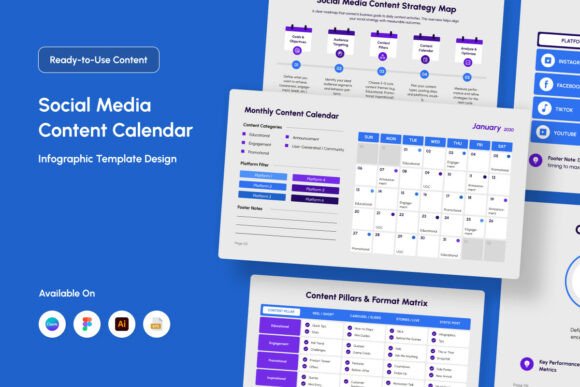
At its core, this planner is more than just a calendar; it is a strategic asset that bridges the gap between ideation and execution. It features editable grid columns and dedicated content-type icons, allowing you to categorize posts by format—such as Reels, carousels, stories, or blog links—at a glance. The inclusion of monthly idea prompts helps eliminate creative block, ensuring you never have to scramble for topics at the last minute. By visualizing your entire month in a single, beautifully designed layout, you can identify gaps in your strategy, maintain thematic consistency, and keep your audience engaged without burning out.
Why Visual Planning Matters for Modern Teams
Creative professionals process information differently than corporate analysts. While data-heavy spreadsheets have their place, they often fail to inspire the creativity needed for social media success. This infographic template addresses that disconnect by offering a professional yet fun interface. The visual nature of the planner allows you to see the rhythm of your content. You can instantly recognize if you have scheduled too many promotional posts in one week or if your educational content is clustered too heavily at the end of the month.
For freelancers and agencies, this visual clarity translates directly to client confidence. Presenting a content strategy using a polished, branded infographic looks significantly more professional than sharing a raw Google Sheet. It demonstrates that you have thought through the visual identity of the campaign, not just the captions. The six included design variations ensure that whether your brand voice is minimalist, bold, playful, or corporate, there is a layout that aligns with your specific aesthetic requirements.
Solving Common Workflow Bottlenecks
One of the primary reasons creators seek out specialized planning tools is to solve specific friction points in their workflow. This Monthly Content Planner Infographic targets several common pain points:
- Creative Fatigue: The built-in monthly idea prompts act as a gentle nudge, providing starting points for campaigns so you spend less time brainstorming and more time creating.
- Inconsistent Branding: With fully customizable colors and objects, the planner itself becomes an extension of your brand guidelines, reinforcing visual identity every time you open the file.
- Platform Fragmentation: Editable grid columns allow you to map out cross-platform strategies side-by-side, ensuring your message is cohesive across Instagram, LinkedIn, TikTok, and email newsletters.
- Software Barriers: Not everyone uses the same design software. By including files for Adobe Illustrator, EPS, Figma, and Canva, this resource ensures no team member is left behind due to technical limitations.
Practical Applications Across Different Roles
The versatility of this planner makes it valuable across a wide spectrum of users. For small business owners, it simplifies marketing management. You can dedicate one column to product launches, another to customer testimonials, and a third to behind-the-scenes content. The visual layout helps ensure you are nurturing your community while still driving sales, preventing the common mistake of over-promoting without adding value.
Educators and coaches will find the content-type icons particularly useful for sequencing curriculum-based content. If you are launching a course, you can visually map out the progression from awareness posts to educational carousels to sales webinars. The ability to edit text and objects means you can create a master template for each cohort, saving hours of administrative setup time.
For social media managers and agencies, efficiency is currency. Having six distinct design variations allows you to service multiple clients with different vibes without purchasing separate assets for each account. The fully layered structure means you can toggle visibility for specific elements, adapting the complexity of the planner based on whether you are doing high-level strategy or detailed daily scheduling. Since the files are RGB at 72dpi, they are optimized specifically for digital screens, ensuring crisp readability during Zoom presentations or asynchronous team reviews.
Customization and Technical Flexibility
A major advantage of this resource is its commitment to accessibility and customization. Many premium templates lock users into specific fonts or rigid structures, but this planner prioritizes user freedom. All text, colors, and objects are fully editable, allowing for complete personalization. Crucially, it uses free fonts, which eliminates licensing headaches and ensures that anyone on your team can open the file without missing typography errors.
The file package is comprehensive, acknowledging the diverse toolsets of modern creatives:
- Adobe Illustrator (.AI) & EPS: Ideal for print-quality adjustments and vector-based customization for agencies with traditional design workflows.
- Figma (.FIG): Perfect for tech-forward teams and UI/UX designers who prefer collaborative, browser-based design environments.
- Canva Link: Essential for beginners, solopreneurs, or clients who want to make simple text edits without learning professional design software.
- Readme Files & Font Info: Provides clear instructions and attribution details, ensuring a smooth setup experience regardless of your skill level.
Important Considerations Before You Start
While this Monthly Content Planner Infographic is a powerful tool, maximizing its value requires the right mindset. First, remember that the template is a framework, not a rulebook. Do not feel pressured to fill every single grid cell immediately. Use the space to plan strategically rather than just filling volume. The goal is sustainable engagement, not exhaustion.
Secondly, consider your team's technical proficiency before selecting a file format. If you are collaborating with a client who has zero design skills, set them up with the Canva version even if you personally prefer Figma. Frictionless adoption is key to long-term consistency. Additionally, because the files are RGB and 72dpi, they are intended for screen use. If you intend to print these planners for a physical office wall, verify that the resolution meets your printing needs or adjust accordingly in Illustrator.
Finally, treat the monthly idea prompts as inspiration rather than prescription. They are designed to spark thinking, but your unique audience insights should always take precedence. Customize the prompts to reflect your niche, seasonal trends, or current events relevant to your industry. When used thoughtfully, this planner transforms from a static document into a dynamic engine for growth, helping you maintain the delicate balance between professional reliability and creative joy.