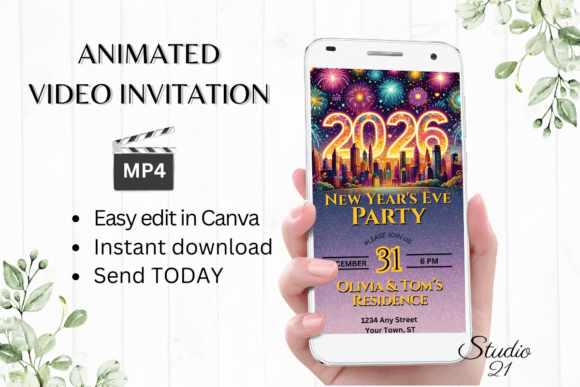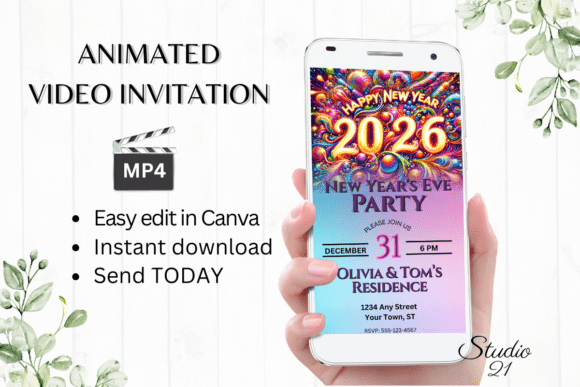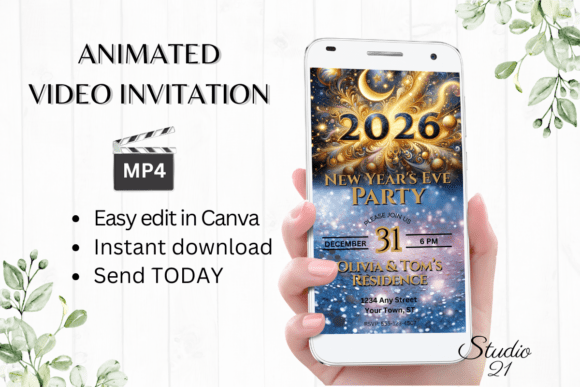
Smartphone New Year's Eve Party Invite: A Practical Guide to Digital Animated Video Invitations
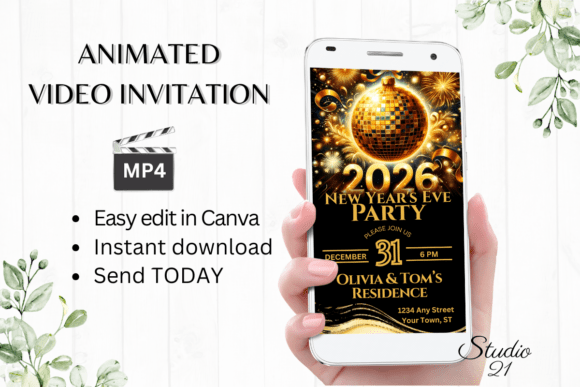
Planning a New Year’s Eve celebration often involves a chaotic mix of venue booking, menu planning, and guest list management. Amidst this flurry of activity, the invitation itself can become an afterthought or a logistical headache. The Smartphone New Year's Eve Party Invite solves this specific friction point by transforming the traditional paper card into a dynamic, animated video template optimized for mobile screens. Rather than waiting for print proofs or wrestling with complex graphic design software, hosts can download, edit, and send a professional-quality evite within minutes using Canva.
This digital approach aligns perfectly with how modern guests consume information. We live in a vertical-video era where content is viewed primarily on smartphones. A static image sent via text message often gets lost in a cluttered chat thread, but an animated MP4 file commands attention. By utilizing a 1080 x 1920 px template designed specifically for mobile viewing, you ensure that your event details are not only seen but experienced. The immediate access to edit means that if your party start time shifts or you need to add a "bring your own champagne" note at the last minute, updates are instantaneous without the waste associated with physical reprints.
Real-World Scenarios for Digital Evites
The utility of a Smartphone New Year's Eve Party Invite extends far beyond casual house parties. Different users leverage these templates to solve distinct communication challenges across personal, professional, and creative spheres.
Last-Minute Social Gatherings
Consider the scenario where a group of friends decides to host an impromptu countdown gathering just three days before December 31st. Traditional printing timelines make paper invitations impossible, and generic social media posts lack the personal touch required for a private event. In this situation, the ability to personalize text and change animation styles in Canva allows the host to create a bespoke invitation that feels planned rather than rushed. You can adjust font colors to match your party theme and export the MP4 directly to WhatsApp or iMessage, ensuring everyone receives the same high-quality visual cue regardless of their device.
Small Business and Client Appreciation Events
Entrepreneurs and small business owners often host New Year’s networking mixers or client appreciation nights. For these professionals, the invitation serves as a brand touchpoint. Using a customizable template allows marketers and freelancers to maintain brand consistency by swapping in specific hex codes and logo placements without hiring a designer. Because there is no need to download external software or fonts, a busy real estate agent or consultant can finalize the invite during a commute or between meetings. The resulting video link can be embedded in email newsletters or shared via LinkedIn DMs, bridging the gap between professional outreach and festive celebration.
Content Creators and Community Building
For bloggers, educators, and influencers, New Year’s Eve is often about community engagement rather than just a physical party. A Smartphone New Year's Eve Party Invite can be repurposed as a teaser for a virtual watch party, a live stream, or a digital challenge. Creators benefit from the editing flexibility to add dynamic text effects that match their content aesthetic. Since the output is an MP4, it is natively compatible with Instagram Stories, TikTok, and YouTube Shorts. This turns the invitation itself into shareable content that drives attendance while reinforcing the creator's visual identity.
Understanding the Editing Workflow
One of the primary advantages of this system is the removal of technical barriers. Many potential users hesitate to create digital assets because they fear a steep learning curve. However, this template operates entirely within the free version of Canva, eliminating the need for expensive subscriptions or proprietary software.
- Text Personalization: You have full control over the narrative. Beyond simply changing names and dates, you can add or delete text blocks to accommodate unique itineraries, such as dinner service times or midnight toast schedules.
- Visual Customization: Font style, color, and size are fully adjustable. This ensures readability on small screens, which is critical when guests are checking details on the go.
- Animation Control: Static invites feel outdated. The ability to change animation timing and effects adds energy to the announcement, mimicking the excitement of the event itself.
- Instant Export: Once satisfied, downloading the personalized evite as an MP4 file takes seconds. There are no rendering queues or approval processes.
This workflow supports iterative editing. If you realize after sending the first batch that the parking instructions were unclear, you can update the master file and resend a corrected version immediately. This agility is impossible with physical stationery and difficult with custom-coded digital invites.
Distribution Strategies for Maximum Reach
Creating the invite is only half the battle; ensuring it reaches guests effectively is equally important. The Smartphone New Year's Eve Party Invite is designed for multi-platform sharing, recognizing that different demographics prefer different communication channels.
For intimate circles, downloading the MP4 and sending it via text, Messenger, or WhatsApp creates a direct, personal connection. These platforms prioritize video content, meaning your invite is less likely to be buried than a plain text message. For larger groups or professional lists, the option to generate a shareable link is invaluable. Instead of attaching large video files to emails—which can trigger spam filters or exceed attachment limits—you can forward a lightweight link that streams the invitation instantly. Detailed instructions provided in the download guide walk users through both methods, removing guesswork from the distribution process.
Critical Considerations Before Downloading
While digital templates offer immense convenience, users should approach them with realistic expectations to ensure satisfaction. Understanding the nature of the product prevents common pitfalls associated with digital downloads.
Digital-Only Format: It is vital to recognize that no physical product will be shipped. This is purely a digital asset. Users expecting a printed card in the mail will be disappointed. This format is ideal for eco-conscious hosts or those managing remote guest lists, but less suitable for formal galas where physical stationery is part of the etiquette.
Device Color Variance: Screens are calibrated differently. The vibrant gold or neon green you see on your laptop may appear warmer or cooler on a recipient's phone. Always test your color choices on multiple devices if exact color matching is critical to your event branding. Sticking to high-contrast combinations generally ensures better legibility across all screen types.
Canva Account Requirement: While no software purchase is necessary, you do need a Canva account to access the template. Fortunately, the free tier is sufficient for all listed editing options. Users should verify they can log in and access the platform before purchasing the template to avoid delays.
Editability vs. Design Integrity: The freedom to change fonts and animations is powerful, but it requires restraint. Overloading the video with too many text effects or clashing colors can reduce readability. Treat the template as a structured foundation; enhance it rather than deconstructing it entirely. The pre-set layouts are optimized for mobile aspect ratios, so maintaining the general hierarchy usually yields the best results.
What You Receive and Next Steps
Purchase grants immediate access to a PDF containing the direct link to the 1080 x 1920 px Canva template, along with a comprehensive user guide. This guide is particularly useful for first-time Canva users, as it outlines specific steps for exporting MP4s and generating share links. Because the template remains accessible in your Canva library, you can reuse and adapt it for future events, making it a sustainable resource for annual celebrations.
Ultimately, the Smartphone New Year's Eve Party Invite represents a shift toward efficient, visually engaging event communication. It respects the host's time by eliminating wait times and technical hurdles, while respecting the guest's preference for mobile-first content. Whether you are organizing a backyard bonfire, a corporate mixer, or a virtual community countdown, this tool provides the flexibility to create an invitation that matches the energy of your specific celebration.