Scan to Pay Sign Template: A Practical Solution for Modern Payment Accessibility
The rise of contactless payments has changed how businesses interact with customers, especially in fast-paced environments like retail, food service, and small events. The Scan to Pay Sign Template meets this growing demand by offering a streamlined way to display payment QR codes. This digital template is designed for ease of use and adaptability, making it a valuable tool for entrepreneurs and creators who want to simplify transactions without investing in complex systems.
What Makes the Scan to Pay Sign Template Unique
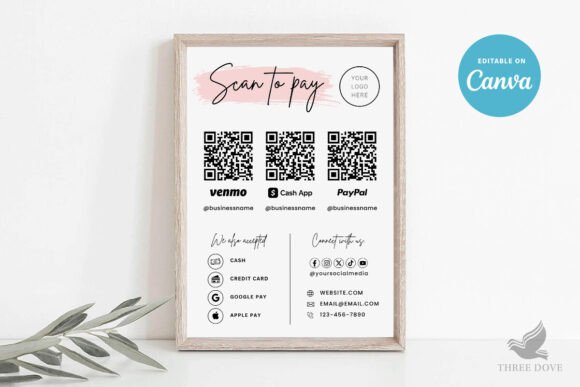
Unlike traditional signage that requires graphic design expertise or software like Adobe Illustrator or Microsoft Word, the Scan to Pay Sign Template is built exclusively for Canva. Users can edit the design directly in their browser, with no downloads or installations required. This accessibility is especially useful for people who need to make quick updates from different devices, including smartphones and tablets.
The template’s design flexibility allows users to modify text, background colors, and layout elements. You can also upload your own logo or images, ensuring the sign aligns with your brand identity. While certain artwork colors remain fixed, the ability to resize and reposition elements gives users a high degree of customization within a structured layout.
Practical Use Cases for This Template
Small business owners, market vendors, and event coordinators can benefit from the Scan to Pay Sign Template when setting up mobile or pop-up payment stations. For example, a food truck operator can print the sign to display at the counter, allowing customers to scan and pay directly through their preferred digital wallet. Similarly, a local artist selling work at a craft fair can use the template to create a clean, professional payment prompt without needing design software.
- Restaurants using QR code menus can integrate payment options directly through this template
- Freelancers and consultants can place the sign at a physical meeting point for instant payment
- Educators and trainers collecting fees at in-person workshops can use it for seamless transactions
Design and Usability Considerations
One of the most appealing aspects of the Scan to Pay Sign Template is its simplicity. The 5” x 7” format ensures it’s large enough to be legible but compact enough to fit in tight spaces. The included Canva tutorial PDF helps users unfamiliar with the platform get started quickly, reducing the learning curve.
However, users should be aware that printed colors may vary slightly depending on the printer and paper quality. It’s wise to review the design carefully before printing, especially when matching brand colors exactly. Since the template is digital-only, there’s no physical product involved, which helps reduce costs and delivery time.
Who Benefits Most from This Template
Professionals who need a fast, customizable, and cost-effective way to display payment QR codes will find the Scan to Pay Sign Template particularly useful. Freelancers, small business owners, and independent creators often operate with limited resources and need tools that integrate smoothly into their workflow. This template works well for those already using Canva for branding or marketing materials, as it maintains design consistency across assets.
Additionally, those who frequently update their payment information or rotate signage for different events will appreciate the ability to make unlimited edits without expiration. This flexibility ensures long-term usability, especially when business needs evolve.
Limitations and Recommendations
While the Scan to Pay Sign Template offers many benefits, it’s not a one-size-fits-all solution. Users expecting full design control over every color and vector element may find the restrictions around artwork color adjustments limiting. Also, since the template is only compatible with Canva, those who prefer Adobe-based workflows or advanced design tools might need to look elsewhere.
To get the best results, consider the following tips:
- Test print a draft to verify color accuracy and readability
- Ensure the QR code remains large and clear enough to scan easily
- Use high-contrast colors for text and background to improve visibility
- Include a brief instruction line like “Scan to Pay” for customer clarity
Final Thoughts on the Scan to Pay Sign Template
The Scan to Pay Sign Template is a well-structured, accessible solution for businesses and individuals looking to simplify payment interactions. Its Canva-based format removes common barriers to entry like software costs and technical complexity, while its print-ready design ensures immediate usability. Although it has limitations in full-color customization and advanced editing, the template delivers strong value for those who prioritize speed, flexibility, and professional presentation.
For anyone managing transactions in a physical space—whether at a market stall, pop-up shop, or service desk—this template offers a practical, no-hassle way to integrate modern payment methods into daily operations.