Evaluating Photo Wedding Invitation Template - 013 for Digital Self-Editing
Selecting wedding stationery involves balancing aesthetic preferences, budget constraints, and timeline management. For couples considering a do-it-yourself approach to invitation design, digital templates offer a middle ground between hiring a professional designer and creating a layout from scratch. Photo Wedding Invitation Template - 013 is a specific digital asset designed for self-editing within the Canva platform. Understanding the functional scope, customization limits, and practical requirements of this template is essential for determining if it aligns with your specific wedding planning needs.
Understanding the Digital Template Format
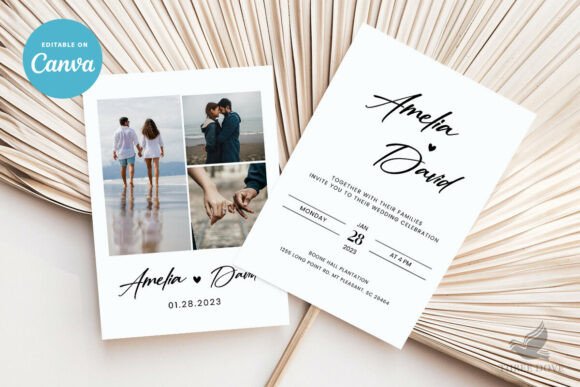
Photo Wedding Invitation Template - 013 is strictly a digital product. No physical items are shipped; instead, purchasers receive immediate access to a customizable file and a tutorial PDF. This distinction is fundamental to the evaluation process. The template operates entirely within the Canva ecosystem, a web-based graphic design tool. Users interact with a pre-structured 5x7 inch layout where text, images, and background elements can be modified.
The "self-edited" designation means that the buyer assumes the role of the designer. While the foundational layout and artwork are provided, the final output depends entirely on user input. This format shifts the responsibility of proofreading, color matching, and layout balance from a professional vendor to the individual. For those comfortable with basic design software, this offers significant autonomy. For those unfamiliar with digital design tools, the included tutorial serves as a necessary bridge, though a learning curve should still be anticipated.
Customization Capabilities and Constraints
A critical factor in evaluating any wedding invitation template is distinguishing between what can be changed and what remains static. Photo Wedding Invitation Template - 013 offers extensive but not unlimited flexibility. Understanding these parameters prevents frustration during the editing process.
- Text Editing: All textual elements are fully editable. Users can modify wording, font families, font colors, sizing, and placement. This allows the template to adapt to various tones, from formal traditional language to modern casual phrasing.
- Photo Integration: As a photo-centric template, users can upload their own engagement or portrait photography. Placement and sizing of these images are adjustable, allowing couples to feature different aspect ratios or compositions.
- Background Flexibility: Background colors can be altered, removed, or replaced entirely. This feature enables coordination with specific wedding color palettes without requiring advanced masking skills.
- Artwork Limitations: While decorative artwork can be resized and repositioned, the colors of the original artwork elements are not editable. This is a significant constraint for couples whose color scheme conflicts with the pre-set hues of the template’s illustrations.
- Expansion Options: The template supports the addition of a back side or extra pages, facilitating the inclusion of RSVP details, accommodation information, or weekend itineraries within the same design system.
Benefits of the Self-Edit Model
The primary advantage of Photo Wedding Invitation Template - 013 is the combination of cost-efficiency and iteration speed. Traditional custom stationery often involves multiple rounds of paid proofs and communication delays. With this digital template, edits are instant and unlimited. There is no expiration on access, allowing users to refine the design over weeks or months without additional fees.
Furthermore, the 5x7 inch dimension is a standard postal size that generally avoids oversized postage surcharges while providing ample space for photography and information. The ability to upload personal logos or monograms adds a layer of bespoke branding that is typically reserved for higher-tier custom stationery packages. For tech-savvy couples who value control over the creative process, this template removes the gatekeeper between concept and execution.
Tradeoffs and Practical Considerations
While the benefits are clear, the self-edit model introduces specific risks and responsibilities that must be weighed against the savings. The most significant consideration is print consistency. Digital screens display colors using RGB light, while printers use CMYK ink. Exact colors may vary slightly between devices and print providers. Without professional color calibration, the final printed product may differ from the on-screen preview.
Additionally, the burden of quality assurance rests solely on the user. Professional designers act as a safety net for spelling errors, alignment issues, and bleed margins. When using Photo Wedding Invitation Template - 013, you must thoroughly review all content before printing. A typo in a digital file becomes a costly error once sent to a print run. The lack of editable artwork colors also presents a tradeoff; if the fixed illustration colors clash with your theme, you may need to search for an alternative template rather than attempting complex workarounds.
Situational Fit: When to Choose This Template
Photo Wedding Invitation Template - 013 is likely a strong fit for specific planning scenarios. It is ideal for couples who have high-quality engagement photos they wish to feature prominently and who possess at least basic familiarity with Canva or similar drag-and-drop interfaces. It is also well-suited for those with flexible timelines who can afford to order test prints and make adjustments based on physical results.
This template is particularly advantageous for weddings with non-traditional timelines or last-minute changes. Because there are no vendor lead times for revisions, updates to venue details or dates can be implemented immediately. Couples managing a strict stationery budget who still desire a polished, photo-forward aesthetic will find the value proposition compelling, provided they are willing to invest time in lieu of money.
When to Consider Alternatives
Despite its versatility, this template is not universally appropriate. If your wedding color palette is rigid and requires exact Pantone matching, the non-editable artwork colors may be a dealbreaker. In such cases, a fully custom designer or a template with vector-based editable graphics would be more suitable.
Furthermore, if you lack confidence in your design eye or attention to detail, the risk of printing errors may outweigh the cost savings. Hiring a professional ensures technical correctness and typographic hierarchy that templates cannot guarantee. Finally, if you require specialized printing techniques such as letterpress, foil stamping, or deckled edges, a standard digital template designed for flat printing will not meet your tactile expectations. These finishes require specific file setups and paper stocks that generic Canva templates rarely support.
Making an Informed Decision
Evaluating Photo Wedding Invitation Template - 013 requires an honest assessment of your skills, resources, and priorities. It represents a functional tool for efficient, personalized stationery creation rather than a turnkey luxury service. Success with this product depends on leveraging its strengths—instant editing, photo integration, and cost savings—while actively mitigating its limitations through careful proofing and print testing.
Before purchasing, verify that your preferred printer accepts customer-supplied PDF files at 5x7 dimensions and review their specific bleed and margin requirements. Compare the fixed artwork colors against your physical swatches rather than relying on screen perception. By approaching the selection process with these practical criteria in mind, you can determine whether this digital template serves as the right foundation for your wedding invitations or if an alternative solution better supports your vision.