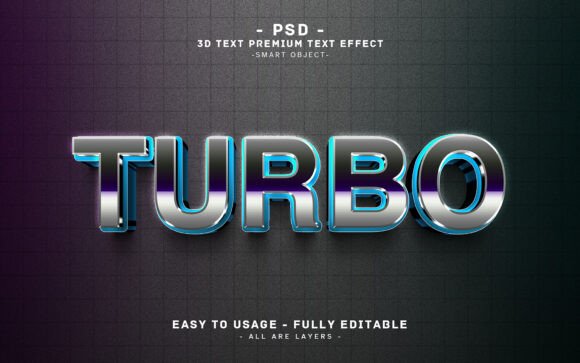
Editable 3D Text Effect TURBO Design – A Practical Tool for Creative and Professional Projects
If you're looking for a quick, high-impact way to add dimension and style to your visual content, the Editable 3D Text Effect TURBO Design might be exactly what you need. This Photoshop-based text effect delivers a bold, metallic, glowing look that can elevate everything from digital banners to print materials. It's not just about aesthetics — it's about making your message stand out with minimal effort.
What Is the Editable 3D Text Effect TURBO Design?
The Editable 3D Text Effect TURBO Design is a downloadable Photoshop file that allows users to quickly apply a sleek, stylized 3D effect to any text or vector shape. The word “TURBO” is used as the default sample, but thanks to the smart object layer, you can easily swap it out for any word or graphic you need. The design includes metallic textures, glowing highlights, and depth that make your text pop off the page or screen.
Each element is organized into clearly labeled layers, making it easy to customize colors, lighting, and background effects. The package includes a high-resolution PSD file, a JPEG preview, and a helpful text guide to walk you through the editing process. Whether you're a seasoned designer or just starting out, this resource is built for accessibility and flexibility.
Where and Why You’d Use This Design
This 3D text effect shines in a variety of contexts. Let’s explore some real-world applications and how different users can benefit from incorporating it into their work.
For Digital Marketing and Web Design
If you're a marketer or web designer, first impressions matter. The TURBO text effect can be used to create striking headlines for landing pages, promotional banners, or email headers. Its bold appearance grabs attention and communicates energy and professionalism. For example, a tech startup launching a new product might use this design to create a hero section that immediately conveys innovation and speed.
Because the file is high-resolution (300dpi) and sized at 2000×1200 pixels, it works well on both desktop and mobile displays. You can export it as a JPEG or PNG and use it across digital platforms without worrying about quality loss.
For Print and Merchandise Design
Small business owners, merch designers, and artists can use the TURBO effect to create branded products that stand out. Think t-shirts, posters, stickers, or even book covers for KDP or other print-on-demand services. The metallic glow adds a premium feel that can make your designs feel more valuable and eye-catching.
One example: a fitness influencer launching a line of motivational apparel could use this design to create a bold “STRONG” or “GROWTH” graphic that pops on black fabric. The ability to edit every element means you can tweak the color scheme to match your brand palette exactly.
In Education and Training Materials
Teachers, educators, and online course creators can also benefit from using this design. When creating slides, infographics, or handouts, having visually engaging text helps learners focus and retain information. The TURBO design can be used to highlight key terms, lesson titles, or motivational quotes that appear throughout your content.
For instance, an instructor creating a video lecture on digital marketing might use the effect to introduce each module with a dynamic title card. The professional look adds credibility and polish to what might otherwise be a basic presentation.
For Personal Projects and Creative Hobbies
Even if you're not a professional creator, the TURBO text effect can add flair to personal projects. Whether you're designing a birthday invitation, a social media graphic for a personal brand, or a digital art piece, this effect gives your work a professional edge. It’s especially useful for those who want to create something impressive without spending hours learning complex Photoshop techniques.
Imagine creating a custom poster for a home gym or a motivational quote for your workspace — the metallic glow effect brings a sense of luxury and inspiration without the need for advanced design skills.
How Different Users Benefit
One of the biggest advantages of the Editable 3D Text Effect TURBO Design is its versatility. Let’s look at how various types of users might apply it differently:
- Freelancers: Can use it to quickly mock up client presentations or social media visuals without spending time building effects from scratch.
- Bloggers: Might use it to create engaging Pinterest graphics or featured images that draw more clicks.
- Entrepreneurs: Could apply it to product packaging mockups, app store banners, or branding materials to maintain a consistent and modern look.
- Students: Can enhance school projects or portfolios with professional-grade visuals that stand out to teachers or potential employers.
What to Consider Before Using This Design
While the TURBO effect is user-friendly, there are a few things to keep in mind before downloading and using it:
- Photoshop Compatibility: Since it's a PSD file, you’ll need Adobe Photoshop or a compatible editor to make edits. If you don’t have access to Photoshop, check if your preferred design tool can open smart objects.
- Customization Time: Although it’s easy to edit, getting the look just right may take a few tries, especially if you're new to layer styles or color adjustments.
- Color and Background Matching: The effect works best when the background and surrounding elements complement the metallic glow. Consider the overall design before inserting the text.
- Usage Rights: Make sure to review the licensing terms to ensure the design can be used for your intended purpose, especially if you're using it commercially.
Final Thoughts
The Editable 3D Text Effect TURBO Design isn’t just another Photoshop brush or filter — it's a ready-to-use solution that saves time and adds visual impact to your projects. Whether you're a professional designer or someone who just wants to create something that looks polished and impressive, this design gives you the tools to do it quickly and effectively.
From digital marketing to personal expression, the TURBO effect adapts to a wide range of needs. And with the included help guide and smart object functionality, you don’t need to be a Photoshop expert to get great results. If you're looking for a way to make your text stand out in a crowded visual space, this could be the tool you've been waiting for.